
Reservation Management System
A centralized platform for managing reservations, waitlists, seating arrangements, and customer interactions. Designed to streamline operations for businesses such as restaurants, cafes, and event venues, ensuring seamless customer experience and optimized table management.
Role & Contribution
As a UI/UX Designer, my role was to develop an intuitive and efficient interface that simplifies reservation handling while enhancing operational control. Responsibilities included:
- User Research & Analysis: Understanding the workflow of reservation managers and staff.
- Wireframing & Prototyping: Creating a structured design flow for ease of use.
- UI Design: Implementing a modern and visually appealing interface.
- Usability Testing: Gathering feedback to refine interactions and improve efficiency.
Design Thinking Process
The project followed the Design Thinking Framework, ensuring a human-centered approach:
EMPATHIZE
DEFINE
IDEATE
PROTOTYPE
TEST
User Research & Target Audience
Primary Users:
- Restaurant owners and managers
- Front-desk and waitstaff
- Customers making reservations (indirect users)
User Needs:
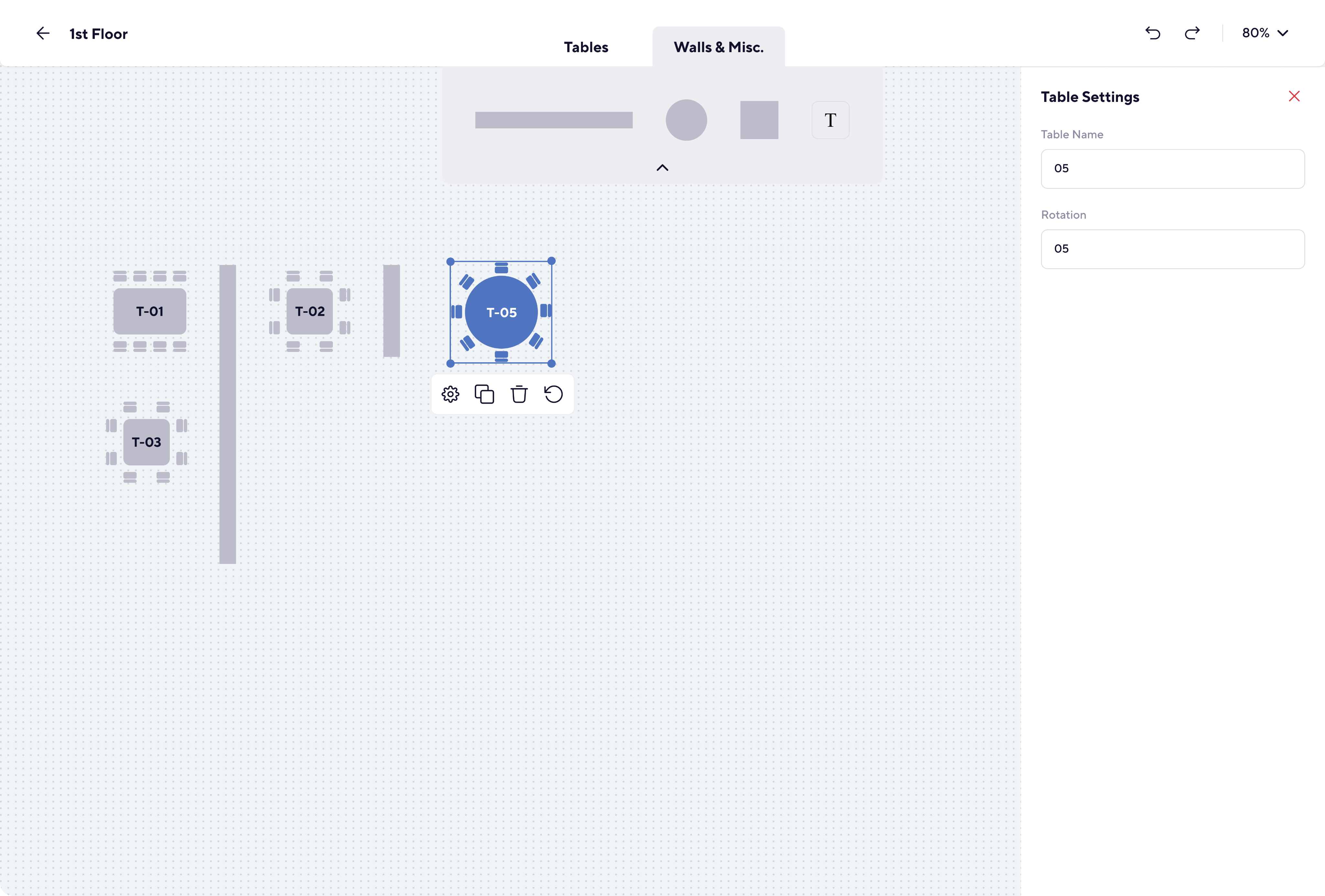
- Quick table assignments with drag-and-drop floor plan interactions.
- Efficient reservation tracking with real-time availability.
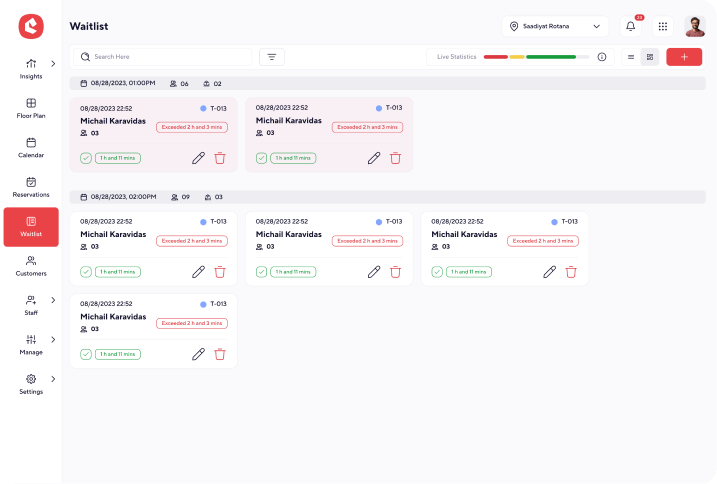
- Waitlist prioritization for seamless guest handling.
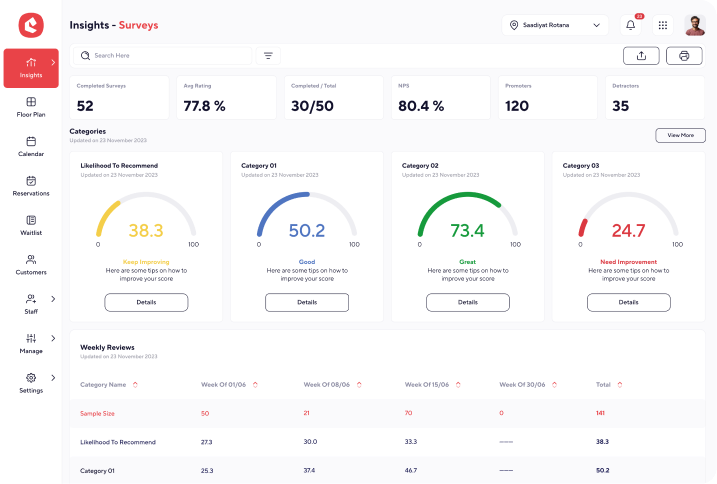
- Insights and reporting for performance analysis.
Design Strategy & Information Architecture
Structure & Layout:
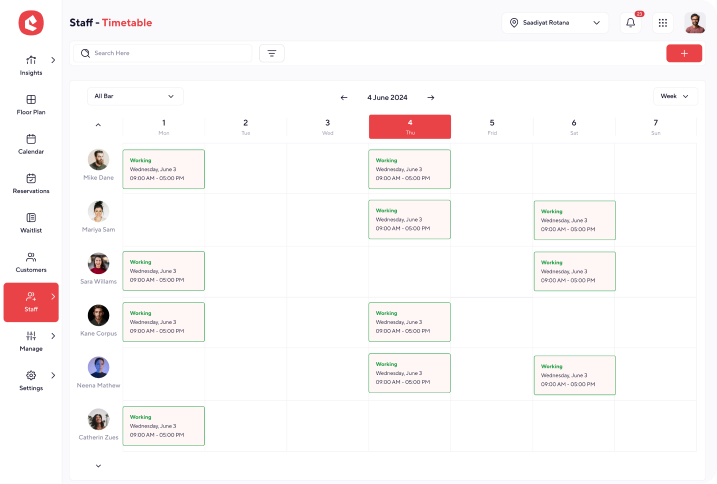
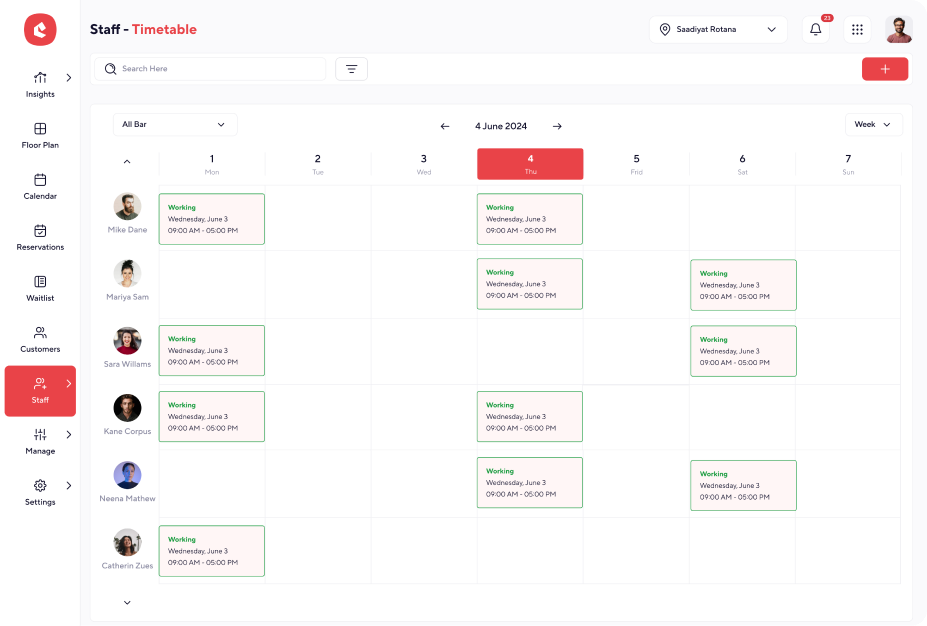
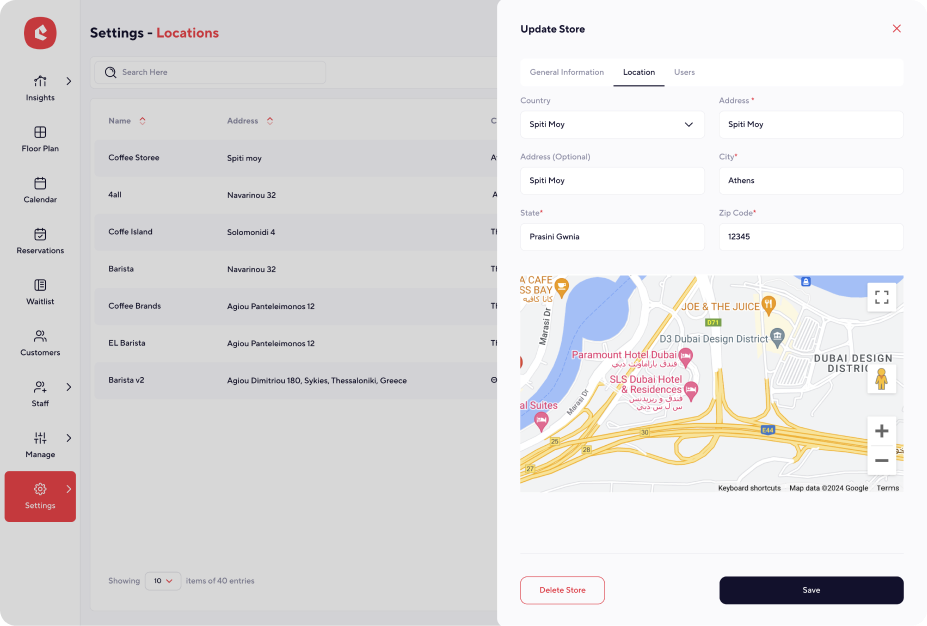
- Sidebar Navigation: Provides quick access to key features like Floor Plan, Calendar, Reservations, and Customers.
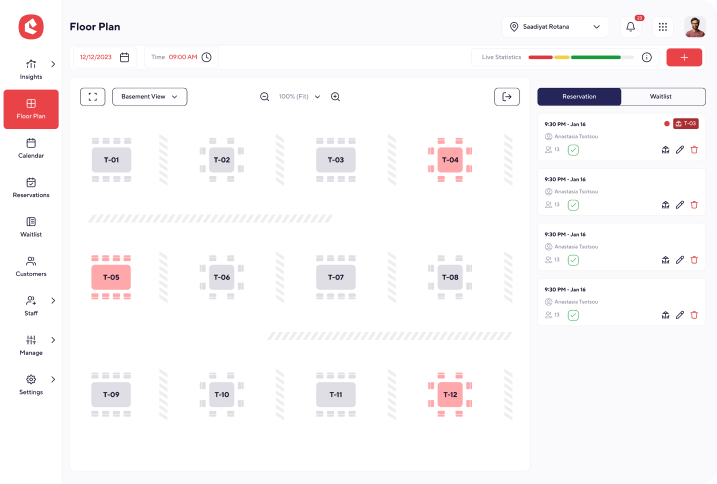
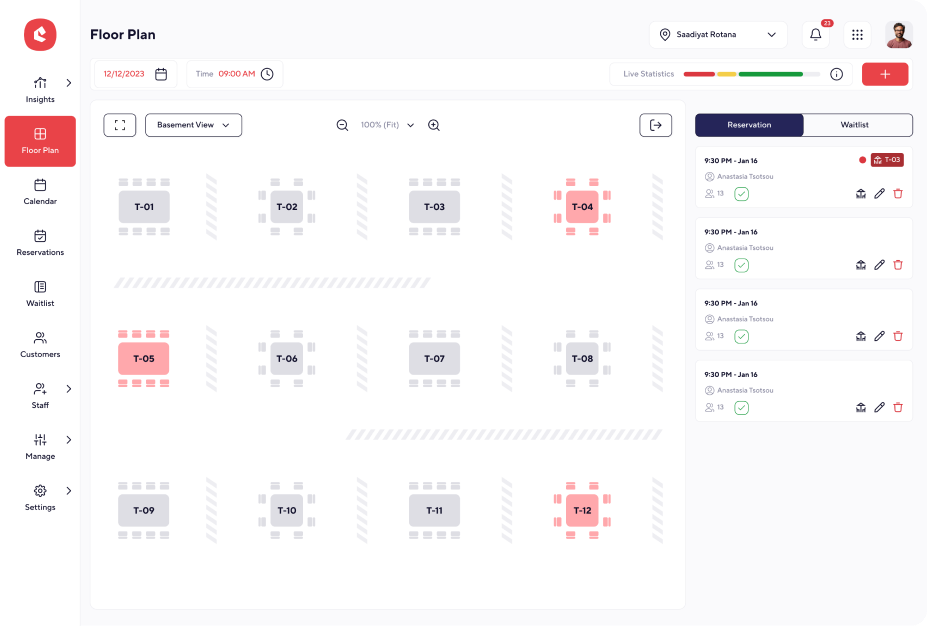
- Dynamic Floor Plan: Allows real-time table assignments and availability tracking.
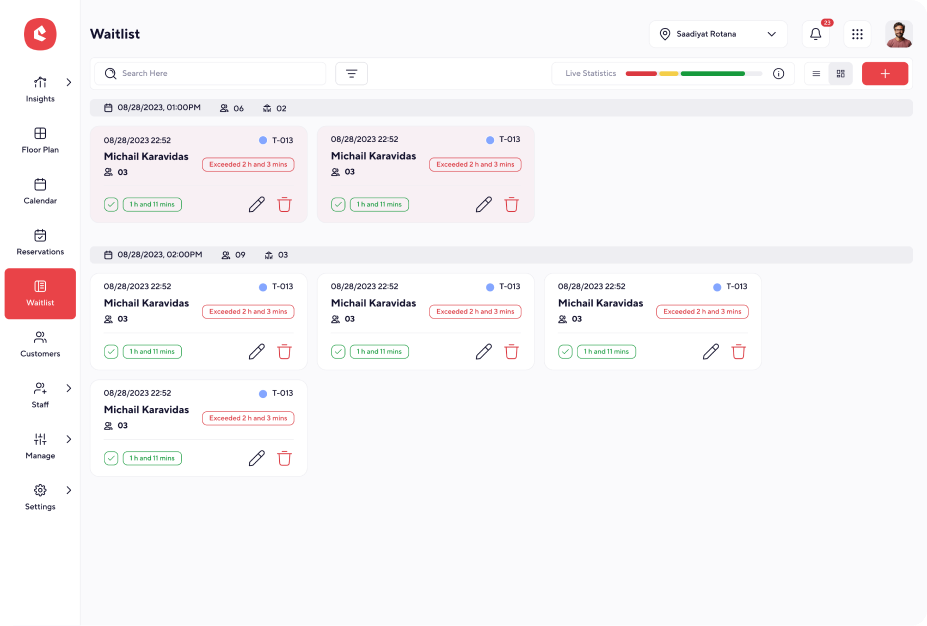
- Reservations & Waitlist Panels: Displays upcoming reservations and allows easy modifications.
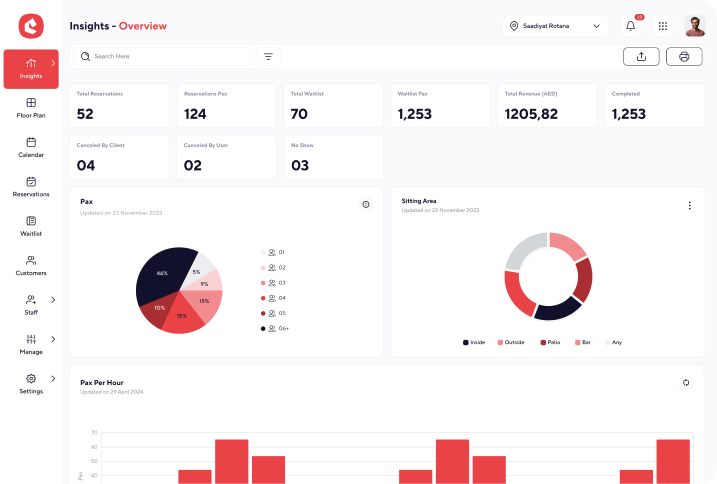
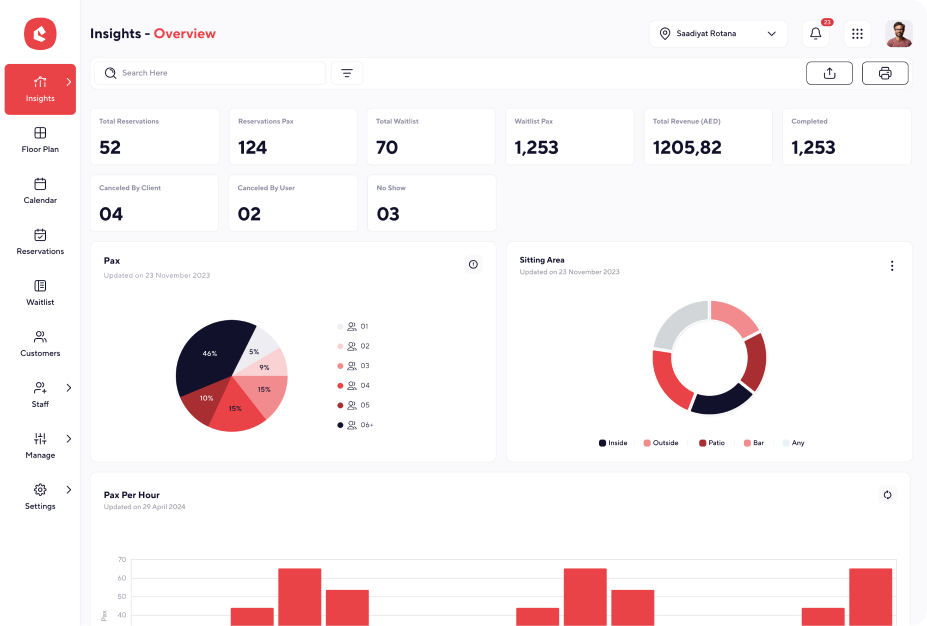
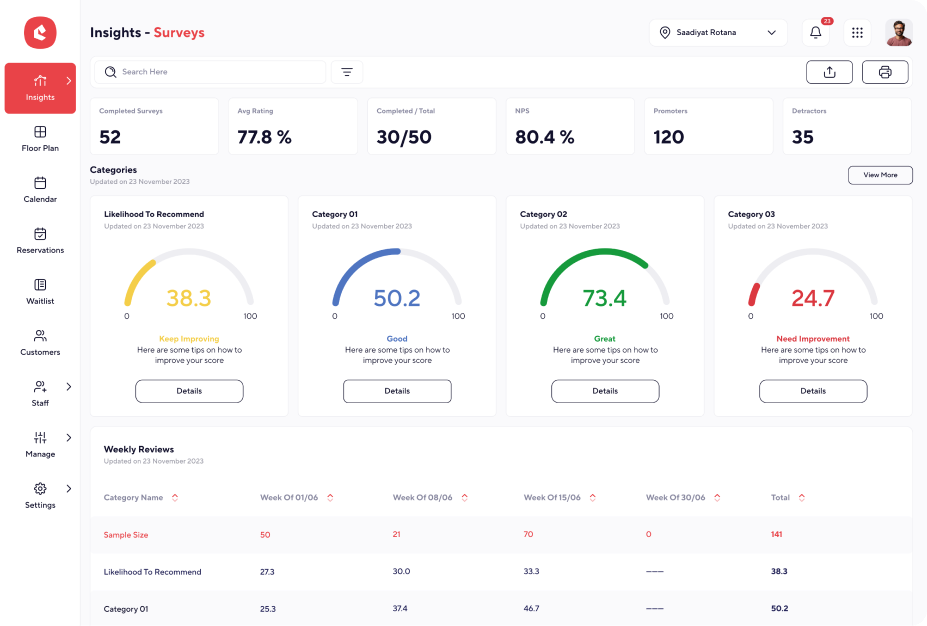
- Insights Dashboard: Provides analytics on reservations, revenue, and occupancy rates.
Key Design Decisions:
- Navigation: sidebar structure ensures quick access to essential features.
- Color Coding: status-based color coding improves table visibility and status tracking.
- Typography: sans-serif fonts for better readability and accessibility.
- Interactive Elements: drag-and-drop functionality for dynamic table assignments.
UI Design Breakdown
Visual Design Principles Applied:
- Minimalist UI: Reducing clutter for better usability.
- Consistency: Buttons, tables, and cards maintain uniform styling.
- Whitespace Optimization: Ensuring clarity and content hierarchy.
UI Components & Features:
- Floor Plan View: interactive seating map with real-time availability tracking.
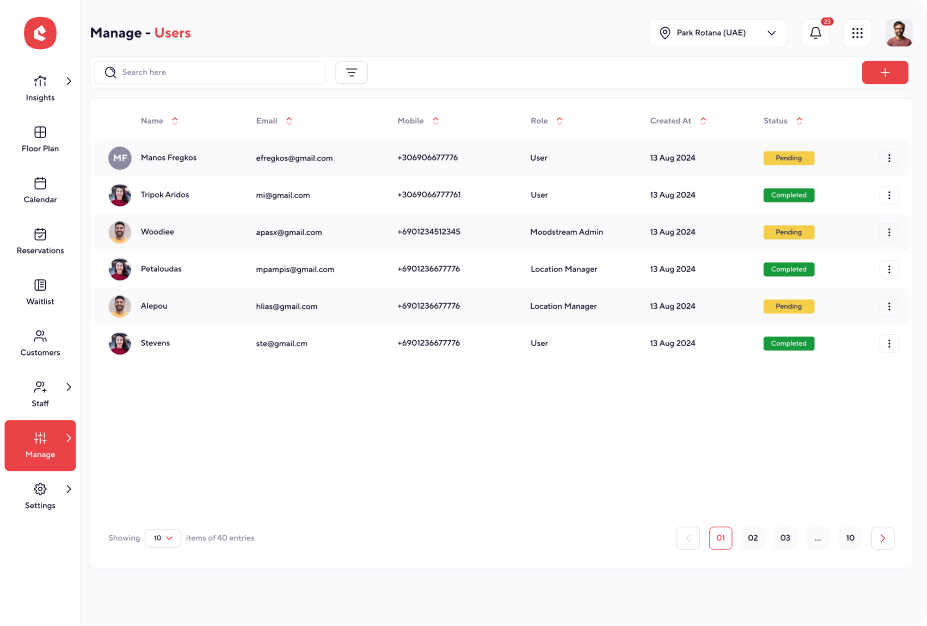
- Reservation Panel: list of current reservations with modification options.
- Waitlist System: priority-based queue for unseated guests.
- Insights Dashboard: provides metrics on reservations, peak hours, and occupancy trends.
Accessibility & Usability Considerations
- High contrast UI for better visibility.
- Keyboard shortcuts & tab navigation for accessibility compliance.
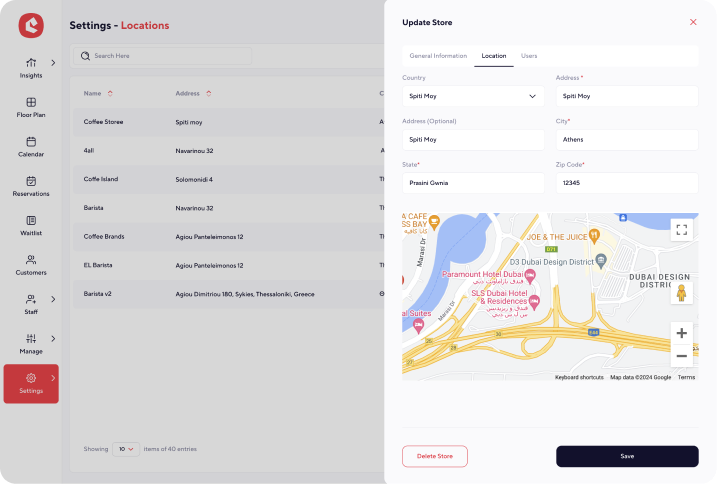
- Clear form validation & error feedback to prevent mistakes in reservations.
Roadmap
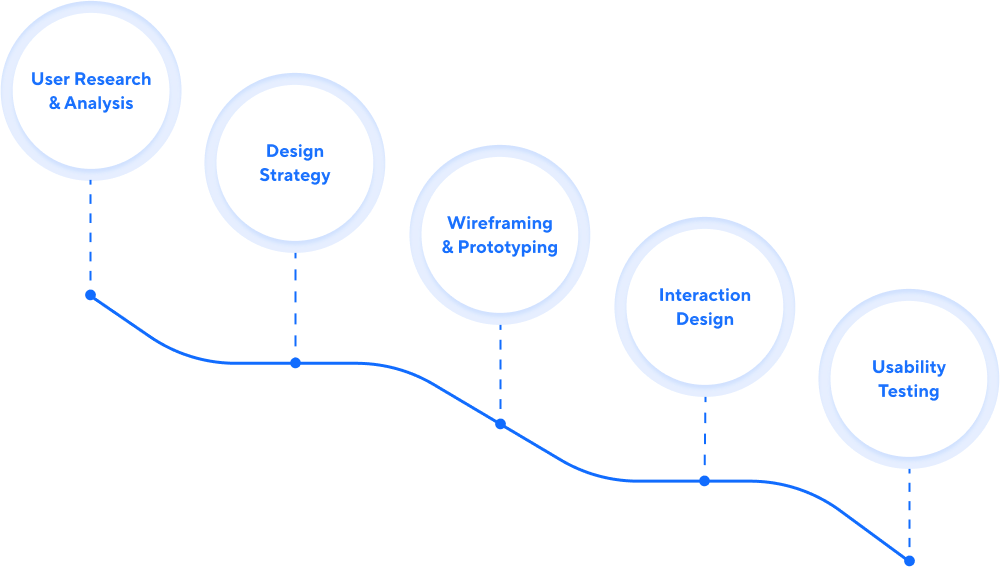
To ensure continuous improvement and feature scalability, the following roadmap was designed:
Outcome & Impact
The Reservation Management System successfully improves the efficiency of handling table reservations, reducing overbookings, optimizing table turnover, and enhancing customer satisfaction. The design aligns with SaaS best practices, offering:
- Streamlined workflows for staff and managers
- Improved guest experience with faster seating and prioritization
- Scalable solution adaptable to various restaurant sizes and formats
Conclusion
By applying a user-centered design approach and leveraging the Design Thinking process, the Reservation Management System provides a well-structured and efficient solution for handling reservations, optimizing table turnover, and improving customer service.

Reservation Management System
A centralized platform for managing reservations, waitlists, seating arrangements, and customer interactions. Designed to streamline operations for businesses such as restaurants, cafes, and event venues, ensuring seamless customer experience and optimized table management.
Role & Contribution
As a UI/UX Designer, my role was to develop an intuitive and efficient interface that simplifies reservation handling while enhancing operational control. Responsibilities included:
- User Research & Analysis: Understanding the workflow of reservation managers and staff.
- Wireframing & Prototyping: Creating a structured design flow for ease of use.
- UI Design: Implementing a modern and visually appealing interface.
- Usability Testing: Gathering feedback to refine interactions and improve efficiency.
Design Thinking Process
The project followed the Design Thinking Framework, ensuring a human-centered approach:
EMPATHIZE
DEFINE
IDEATE
PROTOTYPE
TEST
User Research & Target Audience
Primary Users:
- Restaurant owners and managers
- Front-desk and waitstaff
- Customers making reservations (indirect users)
User Needs:
- Quick table assignments with drag-and-drop floor plan interactions.
- Efficient reservation tracking with real-time availability.
- Waitlist prioritization for seamless guest handling.
- Insights and reporting for performance analysis.
Design Strategy & Information Architecture
Structure & Layout:
- Sidebar Navigation: Provides quick access to key features like Floor Plan, Calendar, Reservations, and Customers.
- Dynamic Floor Plan: Allows real-time table assignments and availability tracking.
- Reservations & Waitlist Panels: Displays upcoming reservations and allows easy modifications.
- Insights Dashboard: Provides analytics on reservations, revenue, and occupancy rates.
Key Design Decisions:
- Navigation: sidebar structure ensures quick access to essential features.
- Color Coding: status-based color coding improves table visibility and status tracking.
- Typography: sans-serif fonts for better readability and accessibility.
- Interactive Elements: drag-and-drop functionality for dynamic table assignments.
UI Design Breakdown
Visual Design Principles Applied:
- Minimalist UI: Reducing clutter for better usability.
- Consistency: Buttons, tables, and cards maintain uniform styling.
- Whitespace Optimization: Ensuring clarity and content hierarchy.
UI Components & Features:
- Floor Plan View: interactive seating map with real-time availability tracking.
- Reservation Panel: list of current reservations with modification options.
- Waitlist System: priority-based queue for unseated guests.
- Insights Dashboard: provides metrics on reservations, peak hours, and occupancy trends.
Accessibility & Usability Considerations
- High contrast UI for better visibility.
- Keyboard shortcuts & tab navigation for accessibility compliance.
- Clear form validation & error feedback to prevent mistakes in reservations.
Roadmap
To ensure continuous improvement and feature scalability, the following roadmap was designed:
Outcome & Impact
The Reservation Management System successfully improves the efficiency of handling table reservations, reducing overbookings, optimizing table turnover, and enhancing customer satisfaction. The design aligns with SaaS best practices, offering:
- Streamlined workflows for staff and managers
- Improved guest experience with faster seating and prioritization
- Scalable solution adaptable to various restaurant sizes and formats
Conclusion
By applying a user-centered design approach and leveraging the Design Thinking process, the Reservation Management System provides a well-structured and efficient solution for handling reservations, optimizing table turnover, and improving customer service.
Reservation Management System
A centralized platform for managing reservations, waitlists, seating arrangements, and customer interactions. Designed to streamline operations for businesses such as restaurants, cafes, and event venues, ensuring seamless customer experience and optimized table management.
Role & Contribution
As a UI/UX Designer, my role was to develop an intuitive and efficient interface that simplifies reservation handling while enhancing operational control. Responsibilities included:
- User Research & Analysis: Understanding the workflow of reservation managers and staff.
- Wireframing & Prototyping: Creating a structured design flow for ease of use.
- UI Design: Implementing a modern and visually appealing interface.
- Usability Testing: Gathering feedback to refine interactions and improve efficiency.
Design Thinking Process
The project followed the Design Thinking Framework, ensuring a human-centered approach:
EMPATHIZE
DEFINE
IDEATE
PROTOTYPE
TEST
User Research & Target Audience
Primary Users:
- Restaurant owners and managers
- Front-desk and waitstaff
- Customers making reservations (indirect users)
User Needs:
- Quick table assignments with drag-and-drop floor plan interactions.
- Efficient reservation tracking with real-time availability.
- Waitlist prioritization for seamless guest handling.
- Insights and reporting for performance analysis.
Design Strategy & Information Architecture
Structure & Layout:
- Sidebar Navigation: Provides quick access to key features like Floor Plan, Calendar, Reservations, and Customers.
- Dynamic Floor Plan: Allows real-time table assignments and availability tracking.
- Reservations & Waitlist Panels: Displays upcoming reservations and allows easy modifications.
- Insights Dashboard: Provides analytics on reservations, revenue, and occupancy rates.
Key Design Decisions:
- Navigation: sidebar structure ensures quick access to essential features.
- Color Coding: status-based color coding improves table visibility and status tracking.
- Typography: sans-serif fonts for better readability and accessibility.
- Interactive Elements: drag-and-drop functionality for dynamic table assignments.
UI Design Breakdown
Visual Design Principles Applied:
- Minimalist UI: Reducing clutter for better usability.
- Consistency: Buttons, tables, and cards maintain uniform styling.
- Whitespace Optimization: Ensuring clarity and content hierarchy.
UI Components & Features:
- Floor Plan View: interactive seating map with real-time availability tracking.
- Reservation Panel: list of current reservations with modification options.
- Waitlist System: priority-based queue for unseated guests.
- Insights Dashboard: provides metrics on reservations, peak hours, and occupancy trends.
Accessibility & Usability Considerations
- High contrast UI for better visibility.
- Keyboard shortcuts & tab navigation for accessibility compliance.
- Clear form validation & error feedback to prevent mistakes in reservations.
Roadmap
To ensure continuous improvement and feature scalability, the following roadmap was designed:
User Research
& Analysis
Design
Strategy
Wireframing& Prototyping
Interaction
Design
Usability
Testing


Outcome & Impact
The Reservation Management System successfully improves the efficiency of handling table reservations, reducing overbookings, optimizing table turnover, and enhancing customer satisfaction. The design aligns with SaaS best practices, offering:
- Streamlined workflows for staff and managers
- Improved guest experience with faster seating and prioritization
- Scalable solution adaptable to various restaurant sizes and formats
Conclusion
By applying a user-centered design approach and leveraging the Design Thinking process, the Reservation Management System provides a well-structured and efficient solution for handling reservations, optimizing table turnover, and improving customer service.